
Visual product tour
See how SwilERP ties billing, stock, and compliance together
Retail, pharma, wholesale, and multi-branch teams use these workflows every day. Skim the visuals and short videos below—then book a walkthrough on your own data model.
35,000+India & Nepal · Retail & wholesale




















Prefer an industry overview before the tour? Browse solutions.
At a glance
SWIL by the numbers
Quick context while you skim screenshots and videos—the same scale and scope behind our free demo and trial requests.
35K+ businesses
Retail, wholesale, pharma, and multi-branch teams run billing and stock on SWIL across India.
30+ years in India
GST-era compliance, distribution, and store operations refined over decades—not a generic import.
All-in-one stack
From counter billing to balance sheet—one ecosystem so month-end isn’t five spreadsheets and a prayer.
Built for your format
Retail, pharma, wholesale & multi-chain operators
Same core platform adapts to counters, warehouses, and branch networks—your demo is matched to the product line that fits.
Retail & speciality
POS-speed billing, schemes, loyalty, and shelf-level stock without spreadsheet chaos.
Pharma & healthcare retail
Batch, expiry, schedules—often paired with Unisolve for wholesale-style distribution.
Wholesale & FMCG
Purchase cycles, supplier performance, and branch visibility for high-SKU businesses.
Multi-branch & HQ
Reporting and policy across outlets while each location runs day-to-day independently.
What’s on this page
Screens, short videos, and install context
Pick a capability area, watch focused setup clips from SWIL Learn, and see how download-to-first-login fits together—before you request a trial or demo.
Interactive tour
Four capability areas—click to explore
The same reporting, purchase, marketing, and compliance screenshots from our classic carousel—now organised as a focused pass so you can compare modules side-by-side with less scrolling.

Reporting & analytics
Slice sales, margins, and stock the way your CA and ops managers actually ask questions—by branch, category, supplier, or scheme.
- Role-friendly dashboards for owners and branch heads
- Drill from summary to voucher-level detail
- Export and share without leaving the ERP context
AFTER YOU DOWNLOAD
From installer to first login
Our team still helps if you get stuck on Windows setup or first company creation.
Setup support
Stuck on setup? +91 95299 13873
Installation journey at a glance
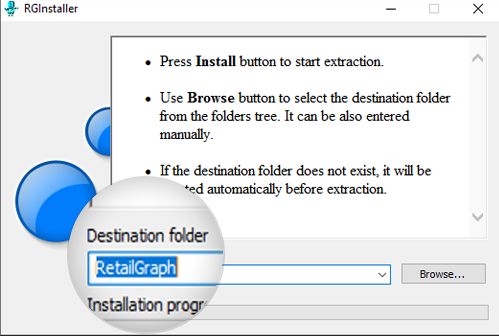 Step 1
Get the build
Download the right installer for your trial or licensed copy.
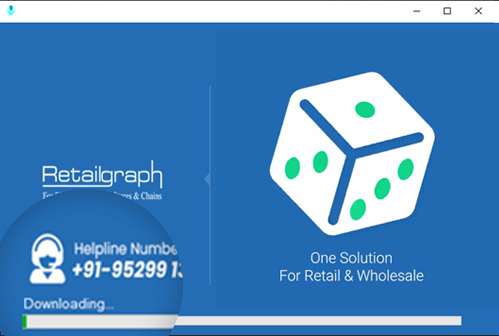 Step 2
Install & prerequisites
Run setup with the recommended Windows configuration.
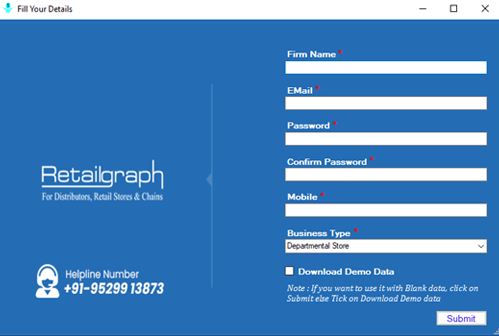 Step 3
Company & masters
Create your company profile and baseline masters.
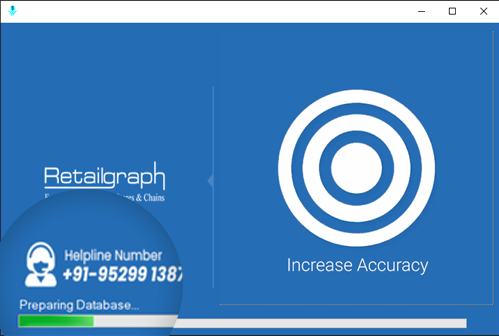 Step 4
Start transacting
Open billing, purchase, and reports with guided checks.
Prefer a specialist to walk you through? Use the number in the sidebar or request a demo—we’ll send the right installer and checklist for your segment.
VIDEO WALKTHROUGHS
After install: initial product tour clips
Step-by-step guides from our library—open in YouTube for full screen and captions. More courses live on SWIL Learn.
SWIL Learn
Structured courses, recordings, and live sessions live on Learn—use these clips to get oriented, then deepen there.
Featured setup clips

Branch Master setup
Create and manage branch masters so multi-outlet data rolls up the way HQ expects.
Watch on YouTube
Billing Head setup
Configure billing heads for clean invoice breakdowns and reporting.
Watch on YouTube
E-way bill workflow
Generate e-way data in-product and push through to the government portal.
Watch on YouTube
Customer Master
Accurate customer records for credit, loyalty, and delivery workflows.
Watch on YouTube
Product Master
SKU, barcode, and category structure that keeps billing and stock aligned.
Watch on YouTube
GO DEEPER
One ecosystem when you outgrow a single product
The same SWIL family powers specialised front-ends and automation—pick what matches your format today, expand tomorrow.
Product lines
Start with SwilERP or a segment-specific surface—automation and mobile layers snap in when your rollout matures.
Explore the SWIL family
- SwilERPCore ERP for inventory, billing, accounting, and multi-outlet operations.
- UnisolvePharma-first workflows with scheduling, substitutes, and compliance-friendly retail ops.
- SwilMartB2B and B2C catalog surfaces with APIs that stay aligned to your ERP masters and stock.
- SwilPOSCounter-speed POS on the same item, tax, and stock picture as your back office.
- Mobile appsField and counter teams stay connected with apps built for real store and van workflows.
- SWIL UnifyConnected-trade layer: harmonised formats and routing for orders, invoices, and stock with partners.
- Automation & integrationSwilBA and connectors reduce re-keying between ERP, e-commerce, and partner systems.
Next steps
From this tour to a live walkthrough
- 1
Skim the visuals
Use the sections above to map modules to how your stores or branches run today.
- 2
Book a demo
Tell us your segment and outlets—we’ll tailor the session to your workflows and integrations.
- 3
Try when you’re ready
Start a trial or pilot branch to validate with your own SKUs, tax profile, and users.
FAQ
Quick answers
Common questions about this visual tour versus a live session.
Is this the same as a live demo?
No. This page is a static visual overview. A demo is interactive and uses scenarios from your business.
Does it cover pharma or wholesale specifically?
The screenshots reflect core SwilERP capabilities; pharma teams often pair this with Unisolve. We’ll show the right product mix on your call.
What happens after I submit the form?
Our team reaches out to schedule a session and, if helpful, share segment-specific references.
Are the YouTube clips the full training?
They’re focused setup guides from our public library—enough to orient new admins. Structured learning paths and live classes live on SWIL Learn.
Do I need to finish install before watching the videos?
No. You can watch masters and e-way clips anytime; they’re easiest to follow once the software is installed and you have a test company.
Ready for a walkthrough on your data model?
Bring your branch count, key integrations, and compliance priorities—we’ll show the shortest path to go-live.
No obligationTailored to your segmentIndia-focused workflows